
Frequently Asked Questions
Account Basics
If you're attempting to request a new password but receive a message indicating that the email address does not exist, or if you attempt to create a new account but are informed that the email address is already taken, this indicates that you may already have an account that has not yet been activated.
After creating a new account, a message will prompt the user to verify their email address by clicking a link sent to their inbox. The subject of the email will read "Activate Your New eLotus Account". In the event that you do not locate this email in your inbox, kindly check your spam, junk, and promotions folders.
If you are still unable to locate the email, perform a quick search in your inbox for the subject line "Activate Your New eLotus Account"
If you are having trouble logging in, please click here to reset your password and/or have your username emailed to you.
An email containing your username and a link to reset your password will be sent to you. To reset your password, click on the link in your email. This link is a one-time login and will expire after 24 hours.
After clicking on the link, please change your password once you are in your account by clicking on "My Profile". Enter your new password in the "Password" box and "Confirm Password". Finally, click "Save".
Are you having trouble with your account in which every time you log in, it says password or username is incorrect? You've already reset your password and typed your credentials exactly as is but it still does not let you back in.
If so, the first thing to do is double check your username. Go back to the email received when trying to reset your password to verify your username. In 99% of these cases, the username is not entered correctly (most people accidentally type in their email address instead of their username).
If that still does not work, double check that your credentials are being typed in correctly. Remember, the username and password terminals are case sensitive.
Getting Started
| Live Seminars | Live Webinars | Distance Learning Videos |
Webinar Weekdays | TCM Wisdom Tube | |
|---|---|---|---|---|---|
| Time/Location | Throughout the U.S. on weekends | Online on weekends or weekday | Online anytime. Watch at your own pace. | Online on weekdays | Online anytime. Watch at your own pace. |
| Length of Course | Varies | Varies | Varies | 1 hr | 1 hr |
| Has CEUs/PDAs | Yes (Varies)* | Yes (Varies)* | Some (Varies)* | No | No |
| Quiz Required for CEUs/PDAs | No | Yes | Yes | N/A | N/A |
| Has Lecture Notes | Yes | Yes | Yes | Yes | Yes |
| Can Ask Questions/ Live Interaction |
Yes | Yes | No | Yes | No |
| Can Watch Again | No | Yes*** | Yes | No | Yes |
| Can Do at Home/ Office |
No | Yes | Yes | Yes | Yes |
| Cost | Varies** | Varies** | Varies | Free | Free (limited time only) |
|
Free online access of the Clinical Manual of Oriental Medicine with Live Seminar registrations, Live Webinar registrations, and Online Course purchases. |
|||||
| Live Seminars | Live Webinars | Distance Learning Videos | Webinar Weekdays | TCM Wisdom Tube |
| 8 hours | 8 hours online | Seminar / Webinar recordings |
1 hour online Free | Webinar Weekdays recordings |
 |
 |
 |
 |
 |
|
These are classes that you travel to and attend in person. Each class time varies and is typically set between 8:00 a.m. to 6:00 p.m. For total CEUs and specific course approval, please check the course's purchase page for details. CEU certificates are given upon attendance. No quiz required. |
These are classes you attend via the internet. During the webinar, you will be able to interact with your colleagues, sometimes with the speaker, as well as ask questions through the live chatroom. You must log-in at the scheduled time to attend the webinars. Each class time varies and is typically set between 8:00 a.m. to 6:00 p.m. For total CEUs and specific course approval, please check the course's purchase page for details. CEU certificates are available upon passing a short, 10 questions quiz. |
These are on-demand video recordings of recently held seminars or webinars that you watch at your own pace. You can fast forward, rewind, pause, or stop the recording at any time. The length of these recordings range from 1-13 hours. Some of the video recordings are approved for CEUs/PDAs. The number of units approved for these classes varies depending on the length of the recording. For specific course approval please check the course's purchase page for details. CEU certificates are available upon passing a short, 10 questions quiz. |
These are 1-hour webinars that occur during the week, and are completely FREE. LotusWEBINAR Weekdays are not eligible for any CEUs/PDAs but are great ways for you to take a sneak preview of upcoming classes/speakers. Sign up to receive our weekly invitations. |
TCM Wisdom Tube is an archive of our past Webinar Weekdays. These are 1 hour on-demand video recordings that are completely FREE. Lecture notes included, if available. |
Continuing Education Unit (CEU) is synonymous to Continuing Professional Development (CPD) and Professional Development Activity (PDA).
Yes, our courses are accepted for CEU/PDA/CPD in the United States, Canada, and international associations by CA, FL, IL, and TX Acupuncture Boards, and by NCCAOM, ABORM, AFPA, AHPRA, BAcC, CTCMA, IVAS, NZASA, and NZRA. Please check individual course descriptions for CEU details.
| Types of Courses | Prices |
|---|---|
| Live CEU Seminars | Varies |
| Live CEU Webinars | Varies |
| Distance Learning CEU Courses | Varies |
| Webinar Weekdays | FREE |
| TCM Wisdom Tube (1-hr webinar recordings) |
FREE |
Or to access unlimited CEUs for 365 days, the Annual Gold Pass gives you full access to the Live Webinars and all the Distance Learning CEU Courses for a low rate.
We currently accept Visa, Master Card, and American Express. Charges will be in USD.
After purchasing a course, click on "My Account" then click "My Active Courses" to see a list of courses that you currently have access to. Click on the course name to be taken to the blue-colored course access page. From here, you will be able to find the link to access the course, download lecture notes, and take the CEU quiz.
Live CEU seminars and webinars: 100% refund minus $25 fee for all refunds/exchanges at least 5 business days before the seminar/webinar weekend; no refunds/exchanges thereafter. All requests for cancellations and transfers must be submitted via email. Please send requests to sales@elotus.org.
eLotus reserves the right to cancel classes in the case of unexpected circumstances. In such cases, a full refund of the tuition will be issued. If you are making travel plans for live events, we recommend that you confirm the event with us two weeks prior to the scheduled date. Travel expenses in cases of cancellations will NOT be reimbursed.
Distance learning courses: These online courses are immediately accessible after purchase therefore are non-refundable.
Continuing Education
There are 2 ways to get to the quiz:
1. From the blue course access page, which can be found via My Active Courses then click on course title
2. Click on "My Account" then click "My Quizzes". You will find a list of all the quizzes for the courses you've purchased here. To start taking the quiz for a specific course, click on the name of that course.
Go to "My Account" then click "My CEUs".
If you see “Take Course Evaluation”, click on it to complete the course evaluation. Once completed, go back to "My CEUs", and you will see "View/Print Certificate". Click on it to download a pdf copy of your CEU certificate.
Please save/print a copy of this certificate for your records. CEU Certificates will only remain in your account for two years. A $25 fee will apply if you need to retrieve any previous CEU certificate that are no longer accessible online.
If you are unable to open your certificate or if your certificate is not loading properly, please use Adobe Acrobat Reader.
Yes! Click on the course title to see the exact number of credits that satisfy each category.
Click here to see a list of courses that have SAFETY PDAs for NCCAOM.
Click here to see a list of courses that have ETHICS PDAs for NCCAOM.
You can also view the full requirements for NCCAOM by clicking here.
Yes. If you are an Acupuncture Physician in Florida, please check the box in your course evaluation (after passing the exam) indicating that you would like credits reported on your behalf to cebroker.
No worries, we're happy to help! Please Contact Us right away to let us know. Please note, there is a twenty-five dollar ($25) processing fee for amending a certificate of completion after one has been generated. This includes any requests for correcting your name, license number(s), or licensing board.
After course completion, the NCCAOM will distribute your PDA certificates via email at the end of the day, and your credits will be reported to your NCCAOM portal.
To ensure automated reporting of approved PDA points for PDA approved courses to the NCCAOM® Recertification Transcript, all NCCAOM Diplomates must enter their first and last name and their NCCAOM ID number as recorded on their NCCAOM Certificate into their eLotus account. The NCCAOM ID# cannot contain any characters, letters or leading zeroes, it may have from 3 to 6 digits only.
To ensure we know you are NCCAOM certified, please double-check that you have selected "NCCAOM" as your license board and accurately entered your NCCAOM ID# (3 to 6 digits) in the "License Number" field within your "My Profile" section. Without this information provided in your profile, we will not automatically recognize your NCCAOM certification status.
Important Fees:
There is a twenty-five dollar ($25) processing fee for amending a certificate of completion after one has already been generated. This includes any requests for correcting your name, license number(s), or licensing board(s).
There is a seven dollar ($7) fee for expedited reporting and/or manual reporting per certificate.
Gold Pass Membership
The eLotus Gold Pass is an annual membership program that gives you 365 days of unlimited access to our online English CEU courses. This includes live webinars, videos, audios, and articles.
As a Gold Pass member, you will receive exclusive membership benefits from our Sponsors (Store Vouchers, discounts, and free shipping!). Click here for details.
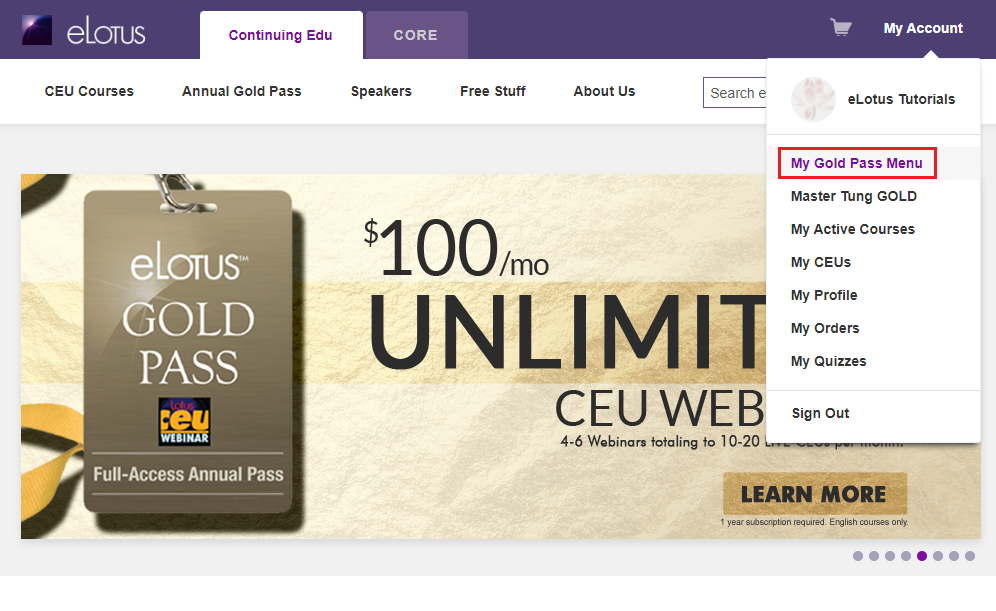
- On the day of the webinar, click on MY GOLD PASS MENU under "MY ACCOUNT".
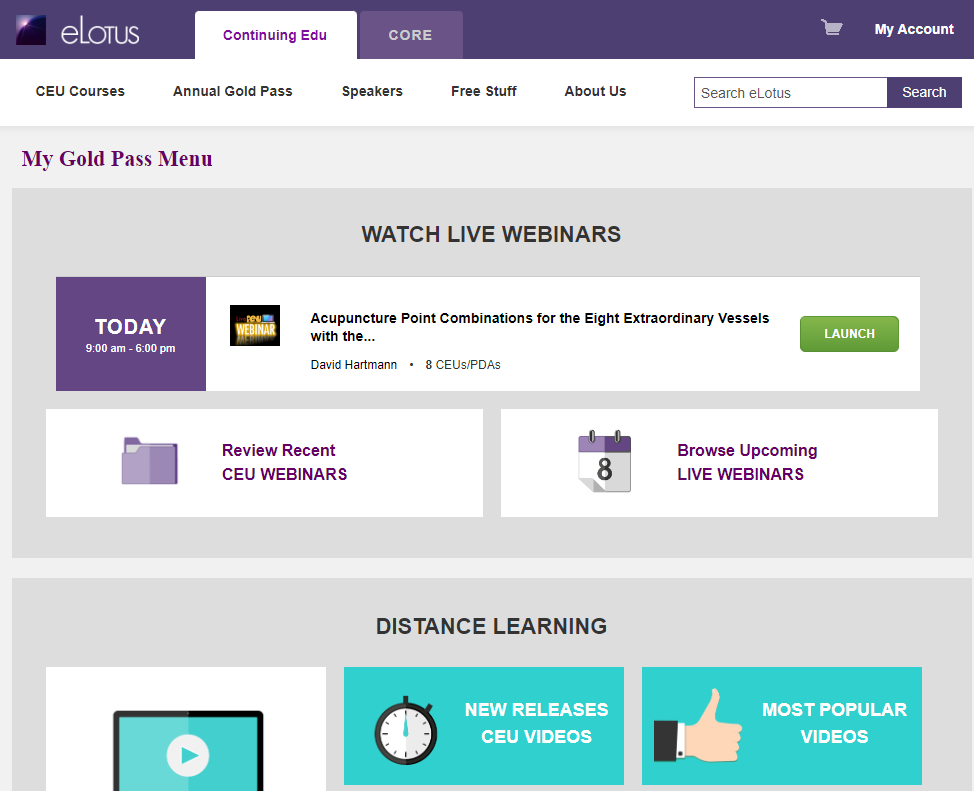
- You will see the webinar event banner at the top of the page. Click "LAUNCH" to go to the blue-colored course access page.
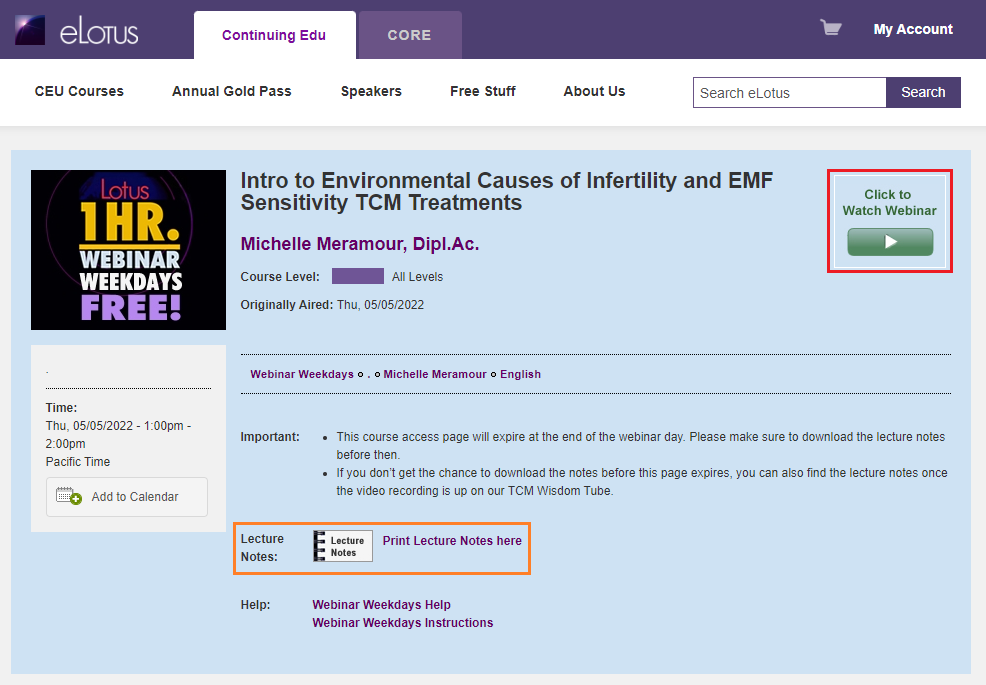
- Click on "Click to Watch Webinar" to enter the webinar room.
Please note, full day attendance from start to finish is REQUIRED. The webinar room opens 30 minutes prior to the webinar start time.
Having issues opening Zoom? Click here.
DISTANCE LEARNING CEU - VIDEO, AUDIO, AND ARTICLE
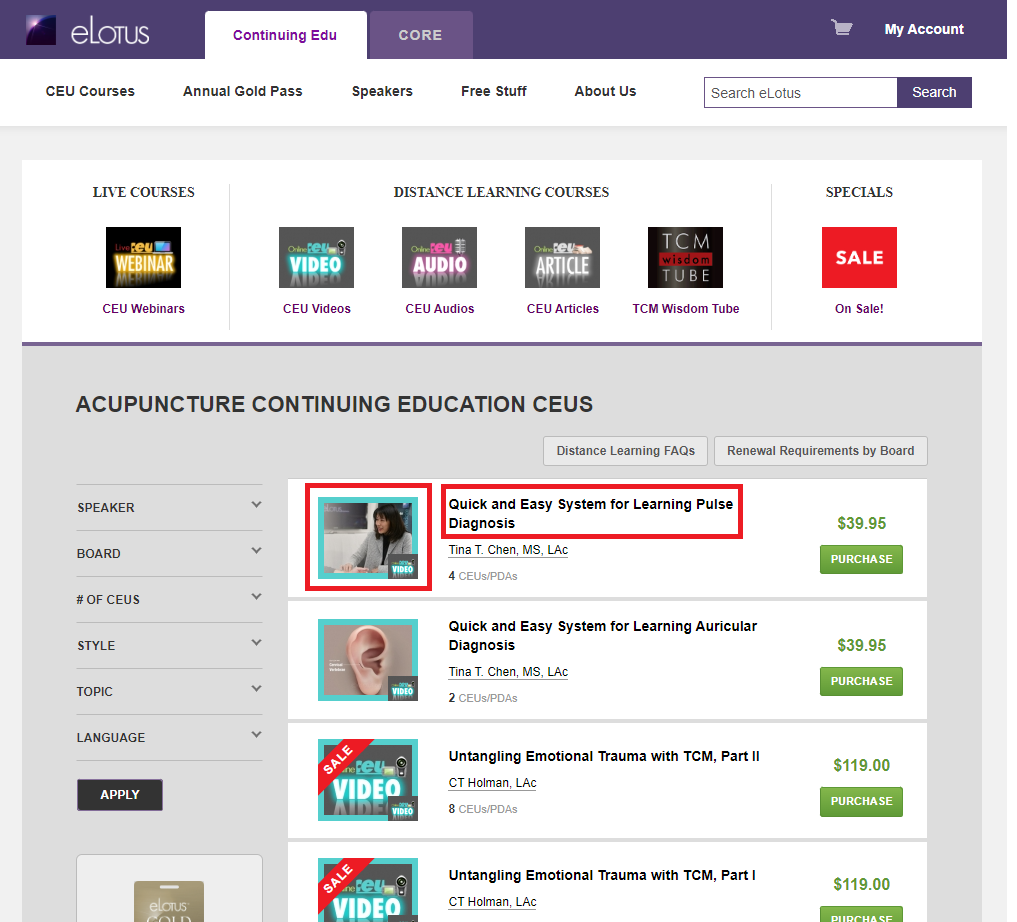
In addition to accessing your courses through the main My Gold Pass Menu, you can now access courses from anywhere on our website. Simply find the course by speaker, topic, or specific boards and click into the course detail page by clicking on the icon or title. 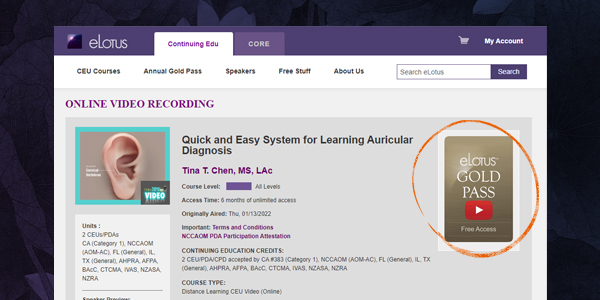
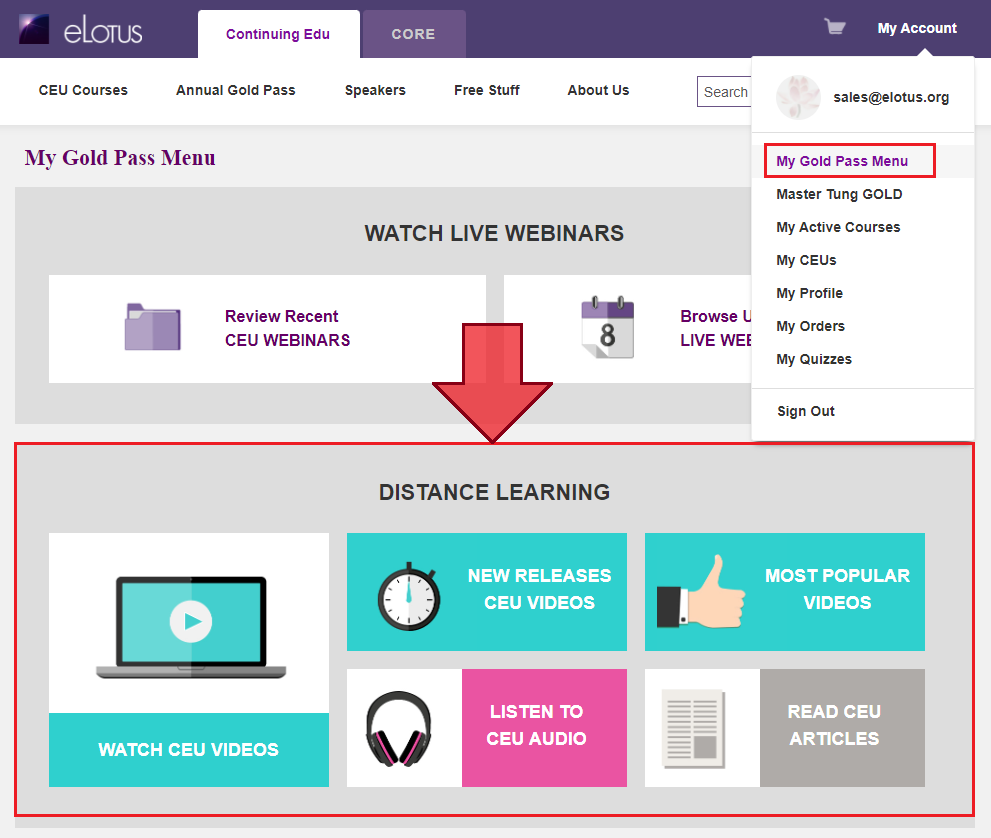
How to access Distance Learning CEU Courses via My Gold Pass Menu:
- Click on MY GOLD PASS MENU under "MY ACCOUNT".
- Under DISTANCE LEARNING, select if you want to WATCH CEU VIDEOS, LISTEN TO CEU AUDIOS, or READ CEU ARTICLES
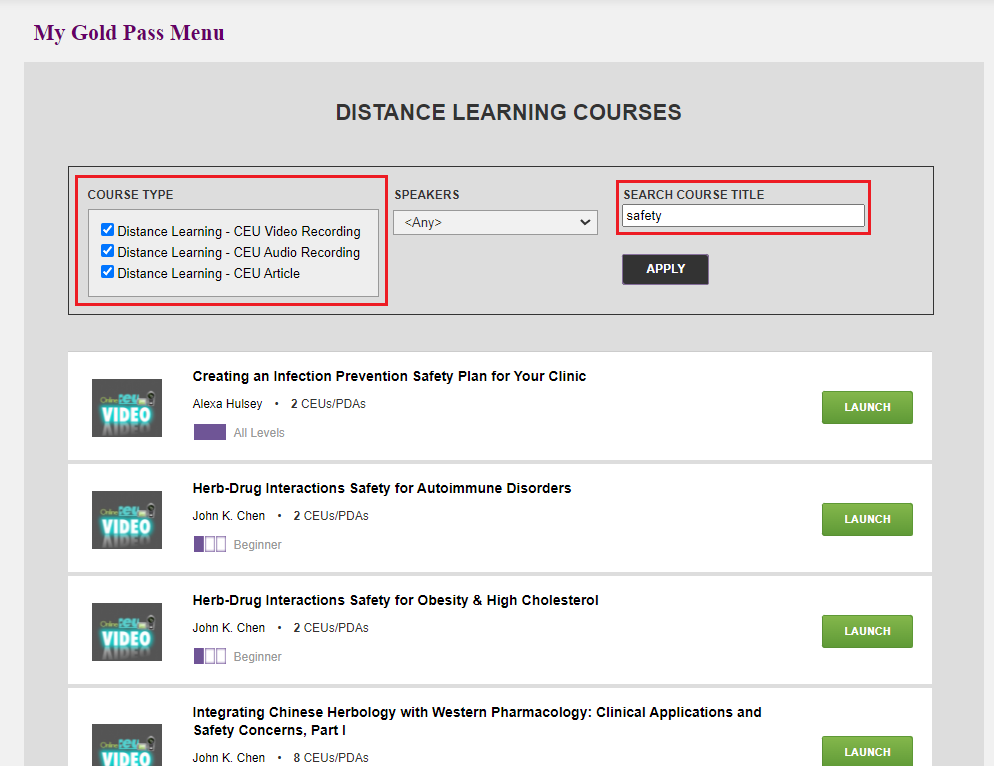
- For distance learning courses in which you want to find a specific speaker, click on "WATCH CEU VIDEOS". Use the filter at the top of the page to select course type and the speaker name. Then click "Apply". For example, if I want to find all courses by Dr. John Chen, I would check mark all 3 course types (video, audio, and article), select "John Chen" as the speaker, then click "Apply".
- Log into your eLotus account
- Click on MY GOLD PASS MENU
- Click on "Review Recent CEU Webinar"
- Click on the course title to open to the blue-colored course access page
- Click yellow-colored "Take Quiz" button
*To receive CEU credit for a Live webinar, the accreditation bodies REQUIRE full attendance. No Exceptions. In other words, logging in late or leaving early, then watching the video replay to make up for lost time does not qualify for CEU credit. And in these cases, exchanges, credits, or refunds will not be honored.
CEUs are included with the purchase of the Gold Pass with no extra costs. A CEU certificate can be printed immediately upon course completion (after passing a short quiz and completing an evaluation), and is saved in your account for up to 3 years.
99% of our live streaming webinars are made into videos after the event is over. But we do encourage you to participate in the live webinars so that you can ask the instructor questions and interact with your colleagues. If a particular webinar will not be archived as a CEU video recording, it will be noted on our website so you can plan ahead.
If you choose to purchase your eLotus Gold Pass with Monthly Installments, your first payment of $499 is due at the time of purchase. The remaining cost will be split into 11 monthly payments of $100, starting one month after the initial purchase. This equals to a total out-of-pocket price of $1599. Currently there are no finance fees with the Monthly Installment option. Additional fees may be incurred as a penalty for late payments.
Alternatively, you can also opt for the pay-in-full option at $1395. Click here for details.
Whether you choose to pay-in-full or with installments, you will receive exclusive membership benefits from our Sponsors (Store Vouchers, discounts, and free shipping!). Click here for details.
SPECIAL EVENTS Live WEBINAR
Upon purchasing any Special Events, the class will be accessible through the My Gold Pass Menu.
- On the day of the webinar, click on "My Account", then click "My Gold Pass Menu".
- Click LAUNCH on the top banner with the day's event.
- On the blue course access page, "Click to Watch Webinar"
- You may also download the lecture notes on this page as well.
Please note, full day attendance from start to finish is REQUIRED. The webinar room opens 30 minutes prior to the webinar start time.
Having issues opening Zoom? Click here.
SPECIAL EVENTS Distance Learning Video Recording
Upon purchasing any a Special Event video recording, the class will be accessible through the My Gold Pass Menu.
- To find the Recorded Video, click My Account then click "My Gold Pass Menu".
- Under DISTANCE LEARNING, select WATCH CEU VIDEOS
- Within the black outlined box, select the SPEAKER then click APPLY
- Scroll to find the Special Event class you entrolled in.
SPECIAL EVENTS WEBINAR
- On the day of the webinar, click on MY ACCOUNT then click "MY Active Courses".
- Under "COURSE TYPE" select Live CEU Webinar then click Apply
- Scroll to look for the Special Event Webinar and click on the course title
- Click the green "Click to Watch Webinar" button
- Register for the Webinar by entering your LEGAL FIRST and LAST name shown on your license and your email associated to your eLotus account
Please note, full day attendance from start to finish is REQUIRED. The webinar room opens 30 minutes prior to the webinar start time.
Having issues opening Zoom? Click here.
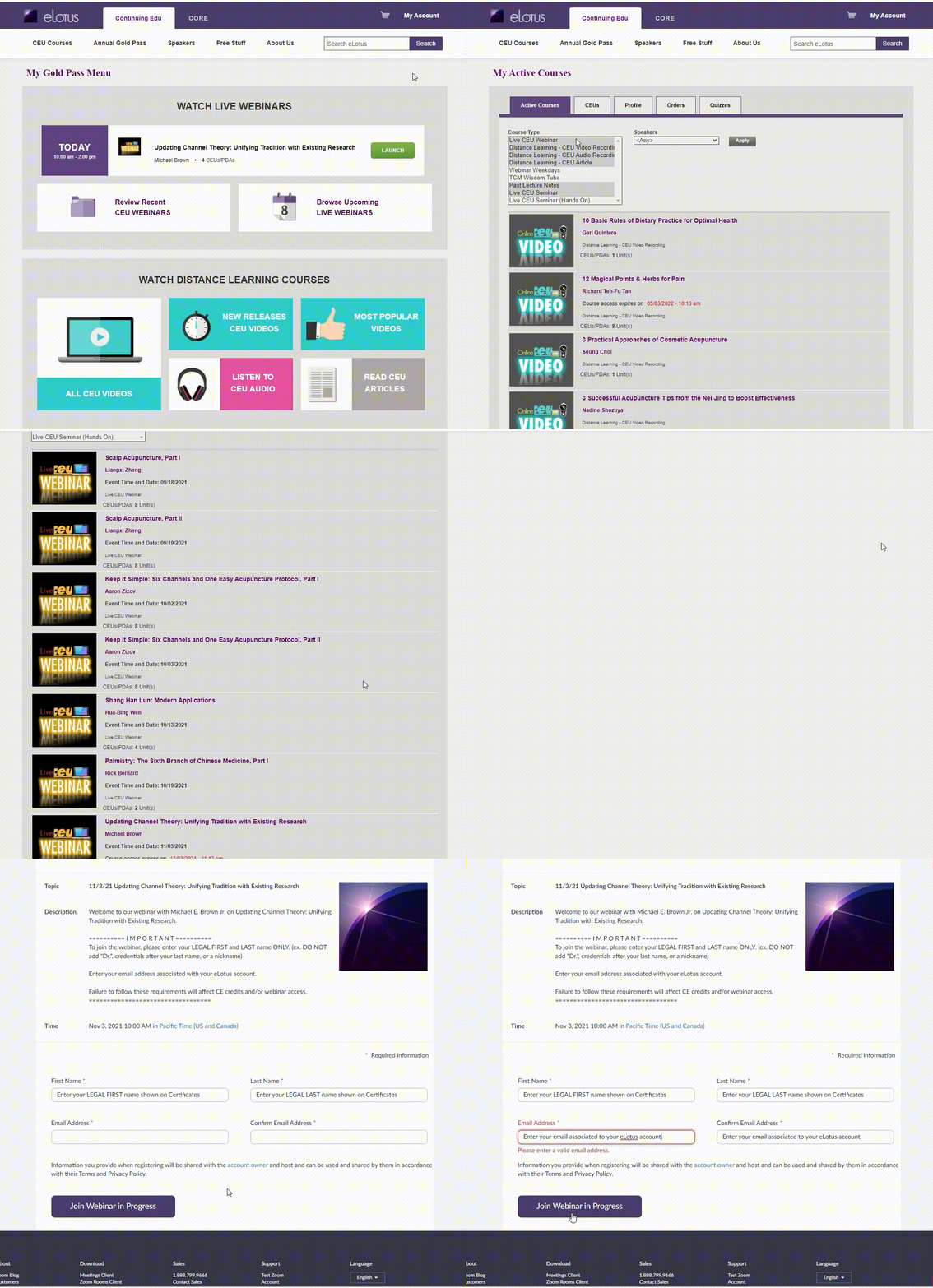
Live-Streamed CEU Webinar (Online)
Follow these steps on the day of your Live CEU Webinar:
Gold Pass holders, please see instructions by clicking here.
- Click My Account after logging in at elotus.org
- Click My Active Courses
- If multiple courses, under Course Type select Live CEU Webinar then click Apply
- Click on the webinar title
- Click the green "Click to Watch Webinar" button and Zoom will automatically open.
- Click the Lecture Notes icon to download the course handouts. (Typically available the day before the webinar)
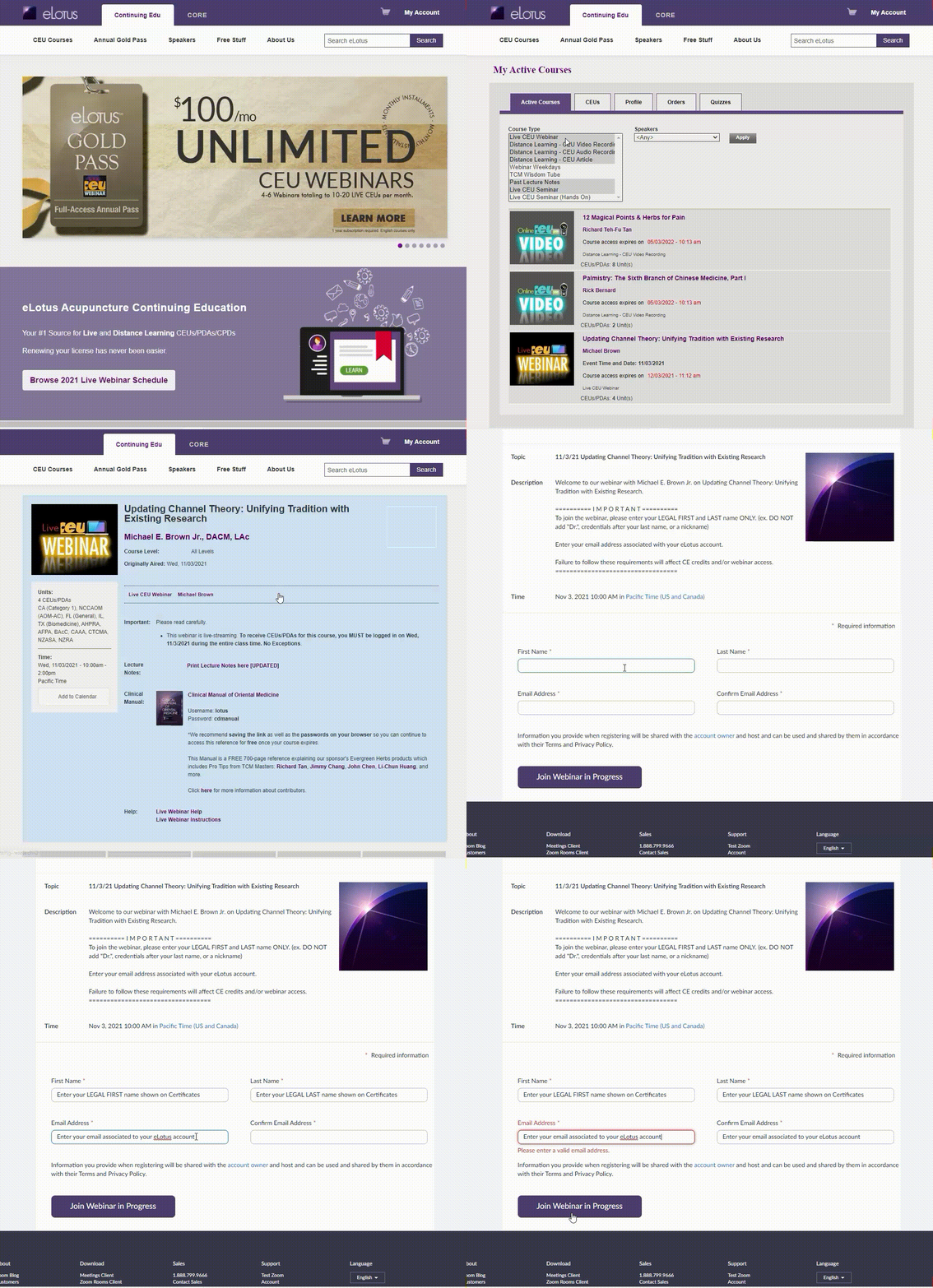
Upon completing the live webinar, you will take a 10-question multiple choice quiz. Quizzes are distributed within 24 hours, typically late afternoon on the next business day. Quiz must have a passing grade of 70% or better to download your CEU certificate.
*Full day Live Webinar attendance is REQUIRED to receive continuing education credits. The accreditation bodies require that you participate as if you were present at an in-person CE. Participating for a portion of the class and then watching the video replay for any missed content does NOT count towards full live attendance.
How to open the Zoom webinar through the installed app on computer
- Follow instructions above to join the webinar.
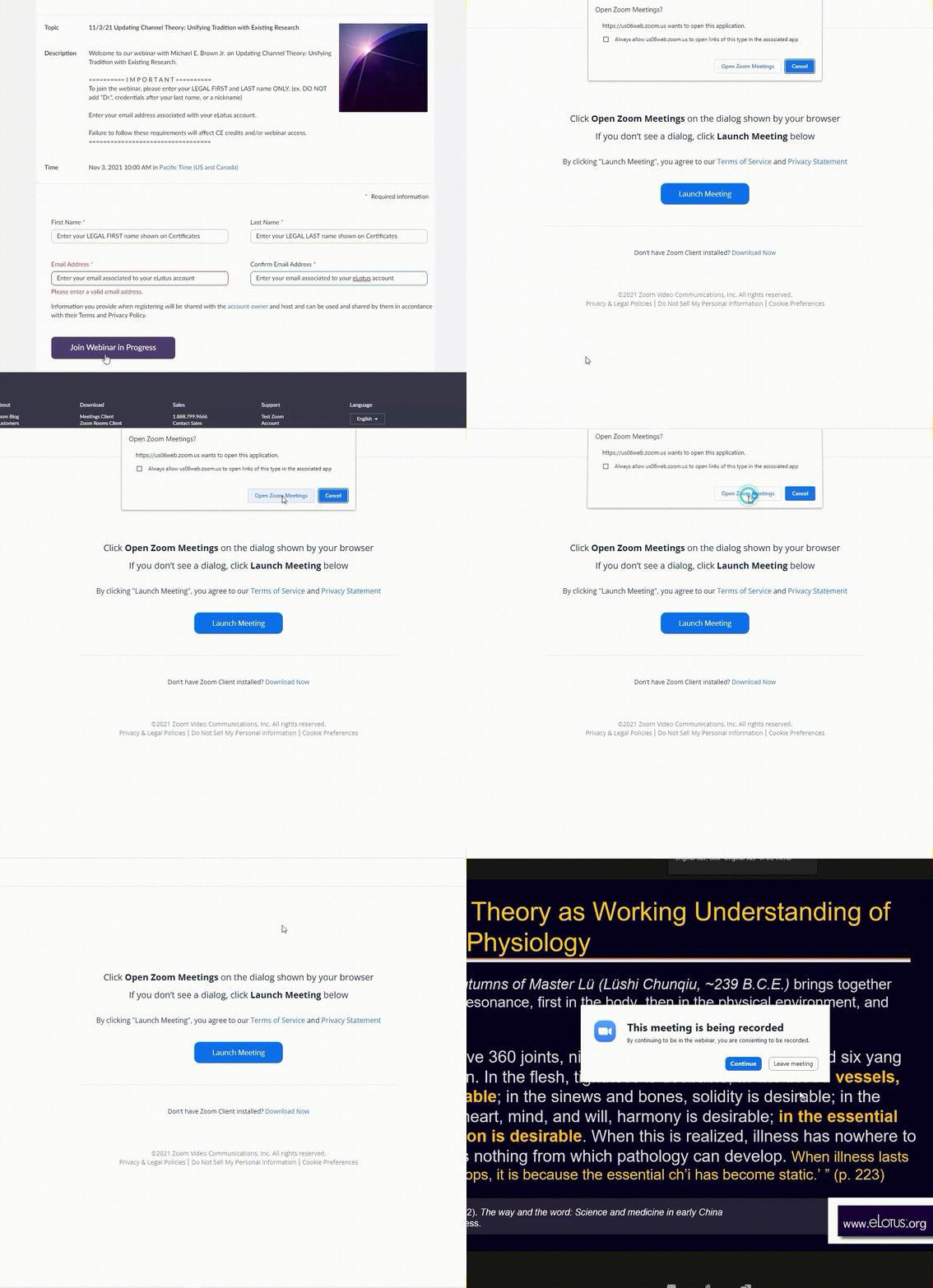
- The Click to Watch Webinar will open a new page, select Open Zoom Meetings when the prompt appears.
How to open the Zoom webinar through the web browser
- Follow instructions above to join the webinar
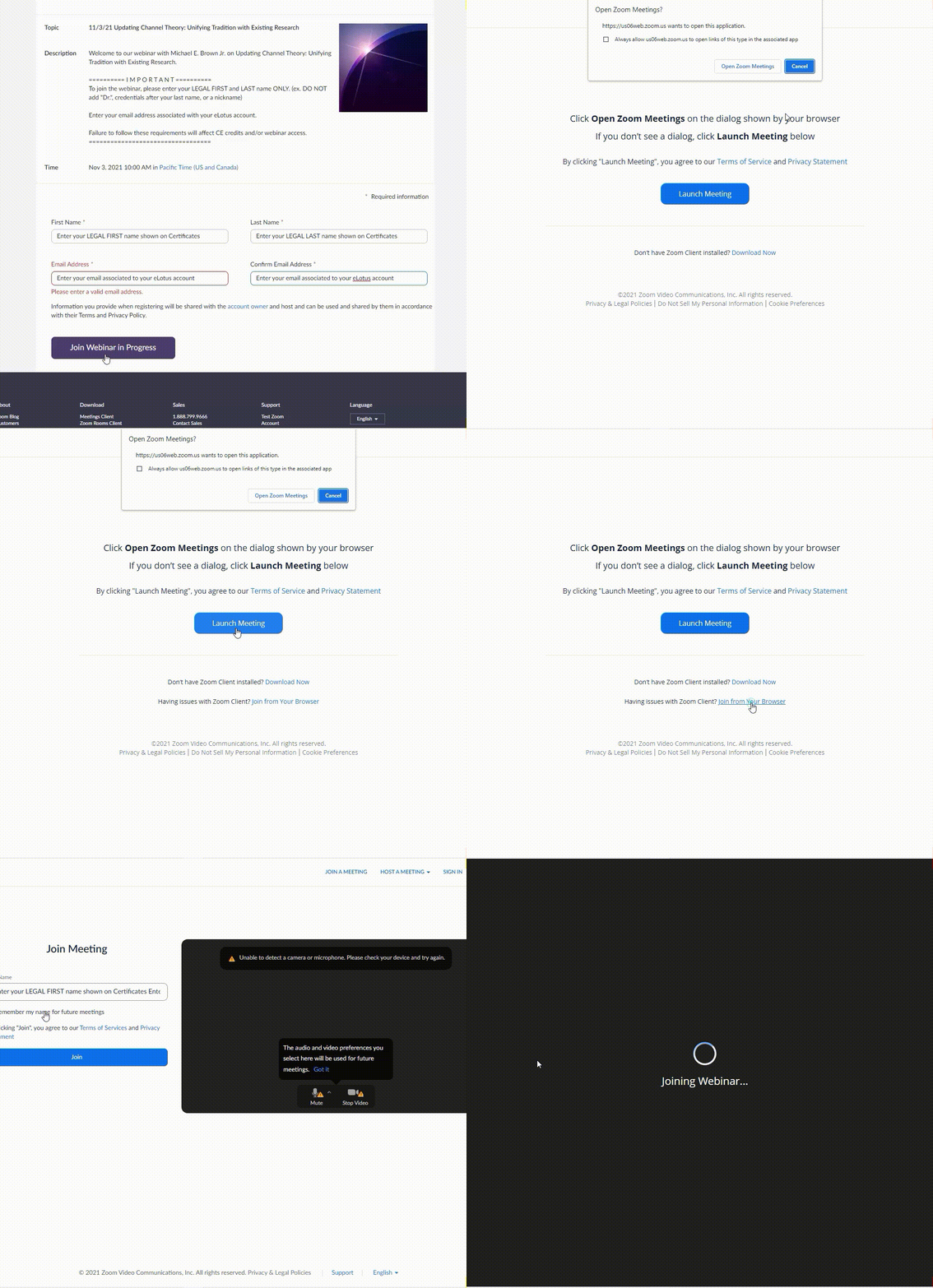
- On the next page, select Cancel. Do not click Open Zoom Meetings.
- Click blue button "Launch Meeting", select Cancel one more time
- A new option will appear below the blue Launch Meeting button and select Join from Your Browser
- Click Join
Quizzes for live webinars are available starting the day after the webinar and open for 4 weeks after the webinar. During the 4-week period, you have unlimited attempts to pass the quiz.
HOW TO TAKE QUIZ FOR CEU CREDIT
1. Log into elotus.org account.
2. Click My Account --> My Active Courses, then click on the webinar title. (GP Members: Click My Account --> My Gold Pass Menu --> Review Recent 8-CEU Webinars --> webinar title)
3. Click the yellow Take Quiz button.
4. Complete Course Worksheet, then click the Submit button.
5. Complete the Quiz. There is no time limit and you may retake the multiple-choice exam as many times as necessary to pass with a score of at least 70%.
6. Go to MY CEUs and click on Awaiting Course Evaluation to fill out the questionnaire. (IMPORTANT: Be sure that your name, licensing board, and license number are correct! Any changes will incur a $25 fee)
7. Return to MY CEUs page and click View/Print Certificate. Select your licensing board to download and print your certificate.
You will need a device (computer, laptop, tablet, or phone) and internet connection to attend a webinar. No special software download is required. It is 100% browser-based.
For a more optimized experience, you can click here to download the Zoom Client.
For best audio and video stability, we recommend using Google Chrome with a wired internet connection.
For best sound levels, we recommend that you use an external computer speaker for your volume control. In addition, we recommend laptop users to have a headset ready as well.
For bandwidth optimization, we suggest having only one browser open for the entire length of the webinar. This will enhance the flow of images from the webinar and maintain the responsiveness of your screen controls. It is also recommended that you do NOT browse the internet while attending the webinar.
To use your iPad or iPhone to join us for a Live Webinar, please download and install the ZOOM Cloud Meetings from the App Store.
To use your Android mobile phone or tablet, please download the ZOOM Cloud Meetings from Google Play.
On the day of your registered webinar, log in to the webinar meeting room by following the steps below:
Follow these steps on the day of your Live CEU Webinar:
- Click My Account after logging in at elotus.org
- Click My Active Courses
- Click on the webinar title
- Click the green Click to Watch Webinar button
- Complete the Webinar Registration by entering your Legal First Name, Legal Last Name, and Email Address associated to your eLotus account.
- After registering, the Webinar ID will be shown under the date and time
- Copy the Webinar ID and open the ZOOM app
- Select Join a Meeting and enter in the Webinar ID number
- Lecture notes: Click the Lecture Notes icon to access course handouts on the course page. (Available the day before webinar)
We utilize an automated platform for our webinars, and live tech support will not be available on the day of the event. To ensure a seamless online experience, we kindly ask that you test your device at least one day prior to the webinar. In the event that you experience technical difficulties and have not tested your system beforehand, we regret to inform you that we are unable to provide any tech support or refund.
Yes. You will be able to communicate with the speaker via the chatroom during a live webinar.
Lecture notes for webinars are typically available 1 day before the CEU webinar. The link to access and download the lecture notes is on the blue course access page for that webinar.
To access and download the lecture notes, follow the steps below:
- Click My Account after logging in at elotus.org
- Click My Active Courses
- Click on the webinar title
- Click the Lecture Notes icon to access course handouts. (Available the day before webinar) See the YELLOW BOX in the sample image below.
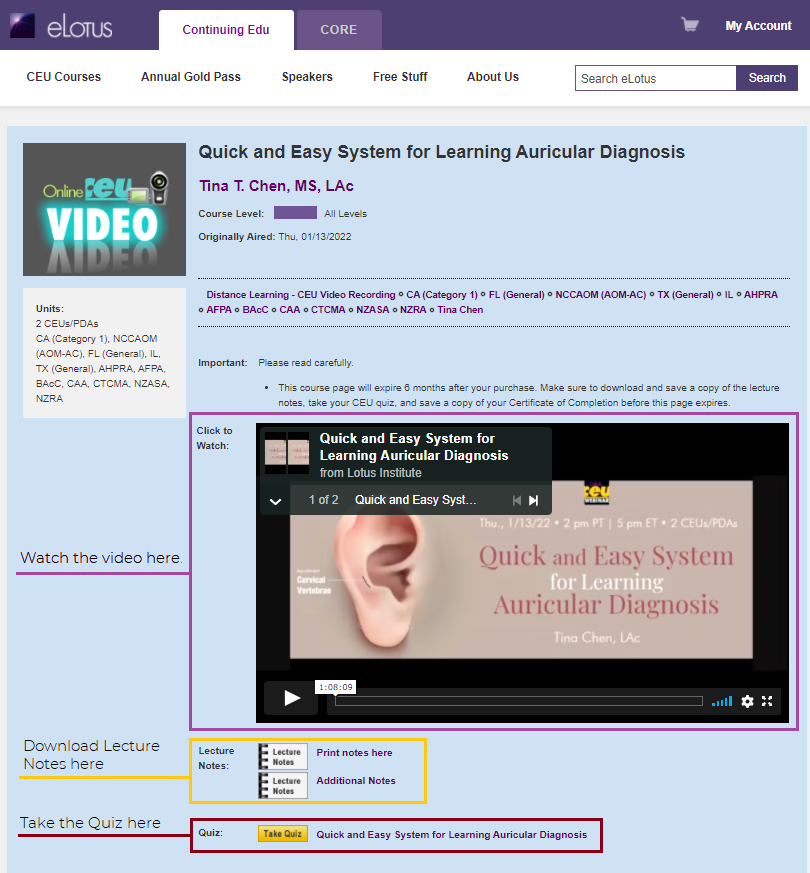
When the recording is available, the link to access the recording may be found on the blue-colored course access page. You will have 4 weeks from the webinar event to watch the class again.
Live CEU Seminar (In-Person)
Live seminars are CEU classes that you travel to and attend in person. Seminars are from 9am-6pm PT. Lunch is from 1pm-2pm PT. There are four 15-minute breaks throughout the day.
Follow these steps on the day of your Live CEU Seminar:
- Arrive before 9am local time to sign in*.
- Enjoy the class.
- Receive CE certificate at the end of the day.
*Seminars are typically held at our Seminar Office in the City of Industry, CA. Visit the course's purchase page for specific location.
You can register for a live seminar up until the day of the class, upon space availability. However, if you register after the Thursday before the seminar weekend, your CEU/PDA certificate of completion might not be available for you on the day of the seminar when you sign in.
Please note, upon space availability, there is a $25 on-site registration fee for in-person seminars.
Yes, you are able to register on-site, upon space availability. However, there is a $25 on-site registration fee. In addition, you will not receive your certificate of completion on the day of the seminar; it will be emailed to you at a later date.
Distance Learning CEU Courses (Video, Audio, Articles)
Distant learning courses are online, on-demand courses you take at your own time and pace. We have 3 different types of Distance Learning CEU online courses:
Videos are online courses that are on-demand and previously recorded webinars.
Audios are audios of our past webinars that you can listen to online or download them as mp3 audio tracks.
Articles are PDFs that you can either read online or download.
Most distance learning online courses are approved for CE credit. The number of units approved for these courses vary depending on the length of the course. For the number of units approved for a specific distance learning course, please check the course purchase page.
Follow these steps to complete your Distance Learning CEU course:
- Log in to your eLotus account
- Click "My Account", then "My Active Courses", then the Course Title
- Complete your video, audio, or article course.
- Pass Quiz upon course completion.
- Receive CE certificate instantly in your account.
To receive CEUs/PDAs for distance learning courses, you will need to pass a short course quiz with 70% or higher, and complete a required course evaluation. Once you have passed the course quiz and completed the required course evaluation, your Certificate of Completion is immediately available for you to print. You will have 4 months from the day of your purchase to pass the quiz, complete the course evaluation, and print/save a copy of your certificate of completion.
Your certificate of completion is available for you to print or download once you pass the course quiz and complete the required course evaluation survey. Make sure to print/save a copy of the certificate for your records. Access to the certificate expires when your course expires. (There will be a $25 retrieval fee for certificates after your course expiration.)
If you are unable to open your certificate or if your certificate is not loading properly, please use Adobe Acrobat Reader.
Yes, lecture notes are included with the video and audio recordings. The link to download the lecture notes can be found on the blue course access page for that course.
To access and download the lecture notes, follow the steps below:
- Log into your eLotus account
- Click on "My Active Courses"
- Click on the course title of the webinar to open the blue course access page
- Click on the "Lecture Notes" logo to start downloading the lecture notes
You will have 6 months from the date of purchase to access a distance learning course. For distance learning courses with CEUs/PDAs, this includes passing the course quiz, completing the course evaluation, and printing/saving your certificate of completion.
Distance learning video courses are web-based. You only need to have internet access (see note below regarding connection speed) and a web browser such as Google Chrome(recommended) or Firefox. No special software download is required to watch these video recordings. It is 100% browser-based.
Click here to run a diagnostic test to ensure your computer and network connections are properly configured and to test your internet speed.
To just listen to the audio recordings, you do not need any program or software, just speakers or a headset.
To download the audio recordings, you will need an unzip program to unzip the file and an mp3 player to play the audio tracks.
If you do not have an unzip program, click here for a free download of WinZip.
If you do not have an mp3 player, click here for a free download of Windows Media Player.
In order to read the CEU articles, all you need is Adobe Reader.
If you do not have one, click here for a free download of the Adobe Reader.
Distance learning video courses are web-based. You only need to have internet access (see note below regarding connection speed) and a web browser such as Google Chrome(recommended) or Firefox. No special software download is required to watch these video recordings. It is 100% browser-based.
Click here to run a diagnostic test to ensure your computer and network connections are properly configured and to test your internet speed.
Webinar Weekdays
LotusWEBINAR Weekdays are our 1-hour webinars that occur during the week, and are completely FREE. During this hour, a seasoned TCM practitioner shares with you their clinical expertise. These webinars are great ways for you to take a sneak preview of upcoming classes and speakers.
Click here to see our Upcoming LotusWEBINAR Weekdays Schedule.
Sign up to receive our weekly invitations to these FREE 1-hour webinars.
No, registration is not necessary for Webinar Weekdays courses. All you need is an eLotus online account. Click here to sign up for a FREE eLotus account.
At the scheduled time of the Webinar Weekday, join the webinar by following the steps below:
- Log into your eLotus account
(Don't have an account? Click here to sign up for a Free account.) - Go to the Webinar Weekdays page under Free Stuff, or click here
- Click on the webinar's course name in the calendar
- In the pop-up bubble, click on "Launch Course" to open the course page for that webinar
- Click on the "Click to Watch Webinar" green button at the top of the course page next to the name of the webinar
- You are automatically connected to the 1-hour free Webinar Weekday!
If lecture notes are available, a link to download the lecture notes will be provided on that Webinar Weekday's course access page. Lecture notes are usually available 1-2 days before the webinar.
To access a Webinar Weekday's lecture notes, follow the steps below:
- Log into your eLotus account
(Don't have an account? Click here to sign up for a Free account.) - Go to the Webinar Weekdays page under Free Stuff, or click here
- Click on the webinar's course name in the calendar
- In the pop-up bubble, click on "Launch Course" to open the course access page for that webinar
- Click on the "Lecture Notes" logo to start downloading the lecture notes
- Print or save a copy of the notes to your computer!
Webinar Weekdays are broadcasted live so you will need to log in at the designated time in order to watch the webinar.
However, many of our Webinar Weekdays are recorded and available for you to view, FREE, on our TCM Wisdom Tube.
Webinar Weekdays are web-based. You only need to have internet access (see note below regarding connection speed) and a web browser such as Windows Internet Explorer or Mozilla Firefox (recommended). No special software download is required to attend the webinars. It is 100% browser-based.
Click here to run a diagnostic test to ensure your computer and network connections are properly configured and to test your internet speed.
Click here to watch a FREE webinar demo. If you are able to view the demo, your computer is compatible to watch our webinars.
CEUs are not awarded by attending the weekly 1 hour webinars. We host these 1-hour webinars as a platform for sharing TCM knowledge at no cost to you! To earn CEUs, please sign up for one of our Live CEU Webinars on the weekends or purchasing a CEU distance learning course (video, audio, article).
TCM Wisdom Tube
The TCM Wisdom Tube is recordings of our past 1-hour LotusWEBINAR Weekdays that are FREE for you to watch.
To access the TCM Wisdom Tube recordings, just log in to your eLotus account.
Don't have an account? Click here to create an account and start watching FREE recordings now.
To watch FREE 1-hour recordings on our TCM Wisdom Tube, just follow the steps below:
- Log into your eLotus account
(Don't have an account? Click here to sign up for a Free account.) - Go to the TCM Wisdom Tube page under Free Stuff, or click here
- Click on the "Launch Course" link next to the course title you would like to watch to open the blue course access page for that recording
- Click on the green play button next to "Video Access" to start the free 1-hour recording!
If lecture notes are available, a link to download the lecture notes will be provided on that TCM Wisdom Tube recording's course access page.
To access a recording's lecture notes, follow the steps below:
- Log into your eLotus account
(Don't have an account? Click here to sign up for a Free account.) - Go to the TCM Wisdom Tube page under Free Stuff, or click here
- Click on the "Launch Course" link next to the course title you would like lecture notes
- Click on the "Lecture Notes" logo to start downloading the lecture notes
- Print or save a copy of the notes to your computer!
No special software is required to watch the recordings. Lotus TCM Wisdom Tube recordings are web-based. You only need to have internet access (see note below regarding connection speed) and a web browser such as Windows Internet Explorer or Mozilla Firefox (recommended). It is 100% browser-based.
Click here to run a diagnostic test to ensure your computer and network connections are properly configured and to test your internet speed.
Click here to watch a FREE webinar demo. If you are able to view the demo, your computer is compatible to watch the recordings.
General
The eLotus Clinical Manual of Oriental Medicine is an herbal reference guide of comprehensive information compiled from experts in the field of TCM on proprietary herbal formulations. Information on each of the herbal formulas include Balance Method acupuncture points by Dr. Richard Tan; auricular acupuncture points by Dr. Li-Chun Huang; pulse diagnosis by Dr. Jimmy Chang; and nutritional advice by Dr. Maoshing Ni. Beyond the formula monographs, this reference guide also includes a Symptom-Disease Index, Chinese Diagnostic Index, and a Drug-Herb Index by Dr. John Chen where you can find no where else.
The Mini Manual of Oriental Medicine contains the formula ingredients, functions, and acupuncture points distilled into the most accessible pocket format.
The complete Clinical Manual of Oriental Medicine set is FREE (a $50 value) with each paid Live Seminar registration.
Online access to the Clinical Manual of Oriental Medicine is FREE with each paid Live Webinar registration or Distance Learning Course purchase.
Click here for more information.


